x86 Windows Shellcoding
learn how to develop custom shellcode for windows in x86 assembly language.
In this tutorial we are gonna understand how to develop shellcode for windows in x86 assembly language.
Features
process independent code
Null Bytes Free
resolve functions at runtime
Basics
for shellcoding to be process independent, shellcode needs to resolve functions at runtime. so that shellcode not need to be depend on which which function main exe import. shellcode will auto resolve the functions at runtime.
so here is the way...
we can use LoadLibraryA to load the DLL, Then use GetModuleHandleA to get the base address of the loaded Dll, And at last use GetProcAddress to resolve the Symbols.
syntax for LoadLibraryA
HMODULE LoadLibraryA(
  [in] LPCSTR lpLibFileName
);

// from kernel32.dll
syntax for GetModuleHandleA
HMODULE GetModuleHandleA(
  [in, optional] LPCSTR lpModuleName
);

// from kernel32.dll
syntax for GetProcAddress
FARPROC GetProcAddress(
  [in] HMODULE hModule,
  [in] LPCSTR  lpProcName
);

// from kernel32.dll
Problem...
All three important functions need kernel32.dll to be imported already. but kernel32.dll is the basics dll and already loaded but the problem is when exe run the address for each function not always same, it changes on every run. so we have to manually find the address for it.
Procedure for solution
find Base Address of kernel32.dll
resolve the export funtion by kernel32.dll
use can then use LoadLibraryA to load other dll
then we can use GetProcAddress to resolve functions within them.
Finding kernel32.dll
Methods for finding kernel32.dll base address
Methods | portability |
|---|---|
utilising PEB | very common and portable |
utilising SEH | less portable not work on modern versions of windows |
Top Stack Method | less portable not work on modern version of windows |
Using PEB method
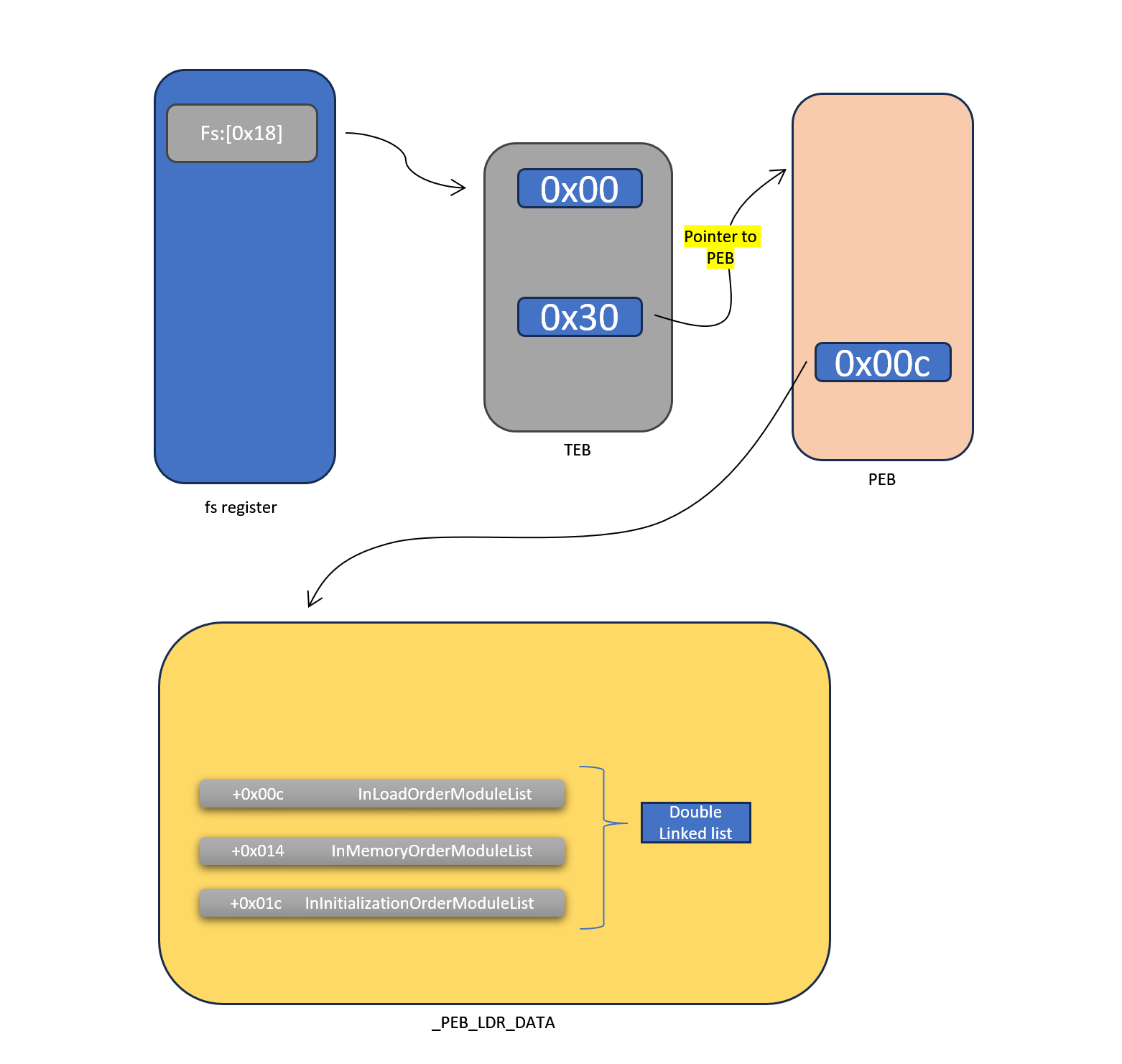
Understanding fs register and TEB
what actually fs register is ?
fs register is a special type of segment register.
it provides a base address
when we do ...
mov eax, fs:[0x30]

; cpu internally does

actuall_address = fs_base + 0x30
eax = *(actuall_address)
what does windows put in fs ?
on 32-bit windows
windows sets fs base = address of TEB
what is TEB ?
TEB stands for thread environment block. it is a small data structure windows provide to every thread.
every thread gets its own TEB
it contains...
SEH chain
Stack info
Thread Id
Pointer to PEB
etc...
for more Contents of The TEB on Windows go to Win32 Thread Information Block - Wikipedia
Come Back to Topic
To Find kernel32.dll...
we have to.
from fs:[0x18] reg get the TEB address
at offset 0x30 from the start of the TEB its pointer to PEB
from start of PEB at offset 0x00c there is a pointer to _PEB_LDR_DATA this structure holds information about loaded modules (DLLs).
in _PEB_LDR_DATA struct at offsets +0x00c, +0x014, +0x01c there is three
double linked list
-> InLoadOrderModuleList
shows the previous and next module in Load Order.
-> InMemoryOrderModuleList
shows the previous and next module in memory Placement order
-> InInitializationOrderModuleList
shows the previous and next module in initialisation order.
what is LIST_ENTRY ?
struct _LIST_ENTRY {
  Flink; // Forward link (next)
  Blink; // Backward link (previous)
}
so
flink -> next element
blink -> previous element
what actually double linked list means here ?
when we see in windbg
InInitializationOrderModuleList : LISTENTRY
this is the HEAD of the list.
It is not a module
it is just a anchor.
MEMORY DIAGRAM
head is at address 1000
ModuleA LIST_ENTRY at 2000
ModuleB LIST_ENTRY at 3000
ModuleC LIST_ENTRY at 4000
Windows Connect Them like...
HEAD (1000)
    Flink = 2000   → first module
    Blink = 4000   → last module

A (2000)
    Flink = 3000
    Blink = 1000

B (3000)
    Flink = 4000
    Blink = 2000

C (4000)
    Flink = 1000
    Blink = 3000
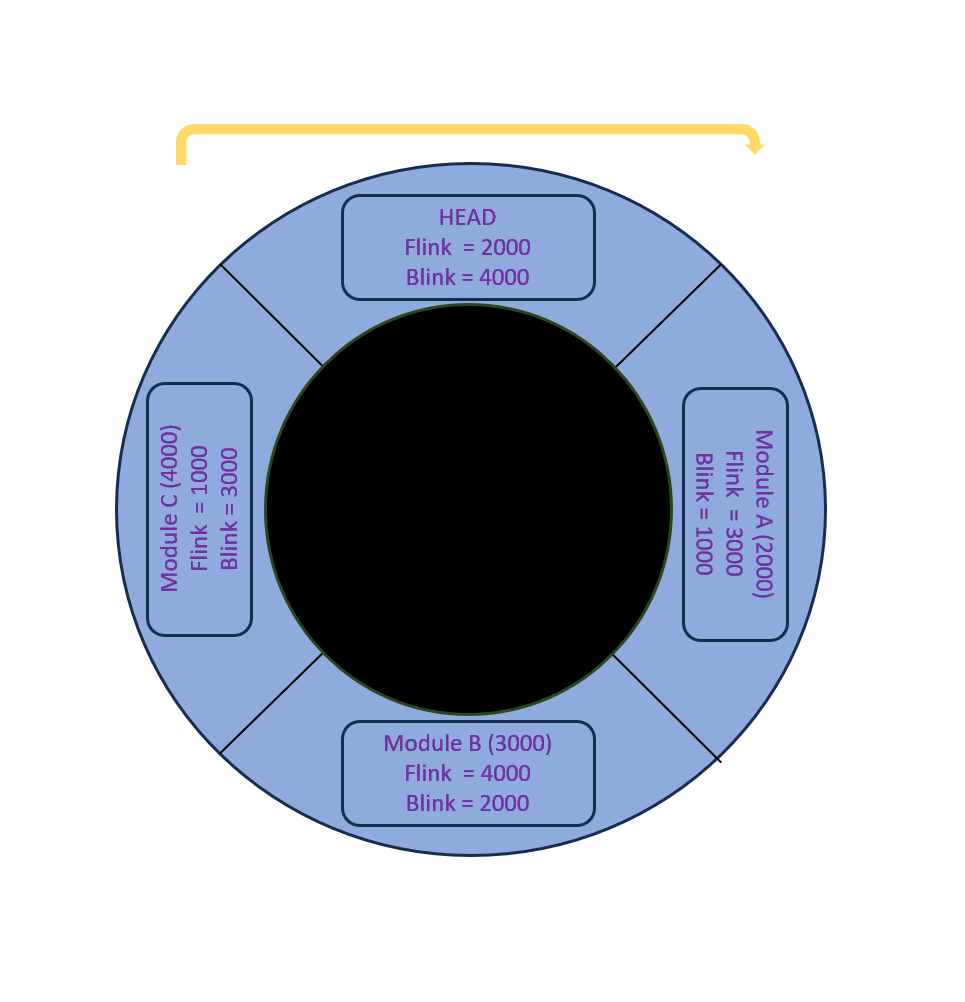
so now focus on InInitializationOrderlinks
from the start of the HEAD if we minus 0x10 we will reach to the _LDR_DATA_TABLE_ENTRY structure
InInitializationOrderLinksis part of _LDR_DATA_TABLE_ENTRY
0:002> dt _LDR_DATA_TABLE_ENTRY (0x04011658 - 0x10)
ntdll!_LDR_DATA_TABLE_ENTRY
   +0x000 InLoadOrderLinks : _LIST_ENTRY [ 0x4011ab0 - 0x4011728 ]
   +0x008 InMemoryOrderLinks : _LIST_ENTRY [ 0x4011ab8 - 0x4011730 ]
   +0x010 InInitializationOrderLinks : _LIST_ENTRY [ 0x4011d88 - 0x776c9abc ]
   +0x018 DllBase          : 0x775c0000 Void
   +0x01c EntryPoint       : (null)
   +0x020 SizeOfImage      : 0x17a000
   +0x024 FullDllName      : _UNICODE_STRING "C:\Windows\SYSTEM32\ntdll.dll"
   +0x02c BaseDllName      : _UNICODE_STRING "ntdll.dll"
   +0x034 FlagGroup        : [4]  "???"
   +0x034 Flags            : 0xa2c4
...
from above we can see at offset +0x018 there is DLLBase for the module
and at offset 0x02c there is BaseDllName for the name of dll which is a nested structure of _UNICODE_STRING type.
here is the syntax for _UNICODE_STRING type structure
typedef struct _UNICODE_STRING {
  USHORT Length;
  USHORT MaximumLength;
  PWSTR  Buffer;
} UNICODE_STRING, *PUNICODE_STRING;
so therefore actual Buffer start from +0x04 from start of the _UNICODE_STRING
therefore DLL name starts at offsets 0x30 from the beginning of the _LDR_DATA_TABLE_ENTRY_
so after these we can parse the InInitilisationOrderModuleList using flink and blink and use the
BaseDLLName field to match to our target module. if we will found we can take its BaseAddress.